
ID Scanner Age, Lane and Schedule Acceptance Checklist
Age verification acceptance guide
Set the rule, then test it at the machine
Use this checklist to review the reader, minimum age, all-channel or selected-channel scope and weekly schedule. Test the actual device with authorized test credentials before opening the machine for age-restricted sales.
1. Establish the requirements for your installation
Confirm the applicable requirements for the specific products, venue and jurisdiction, and verify that the supplied reader supports the credentials you intend to accept. Set the minimum age and verification schedule to the rules your operator is required to follow. A sample threshold on a screenshot is an example, not a statement of the law for every market.
Confirm the device is online and its date, local time and timezone are correct. Record the machine ID and the person performing acceptance without recording customer identity data.
2. Configure the scope and schedule
All channels
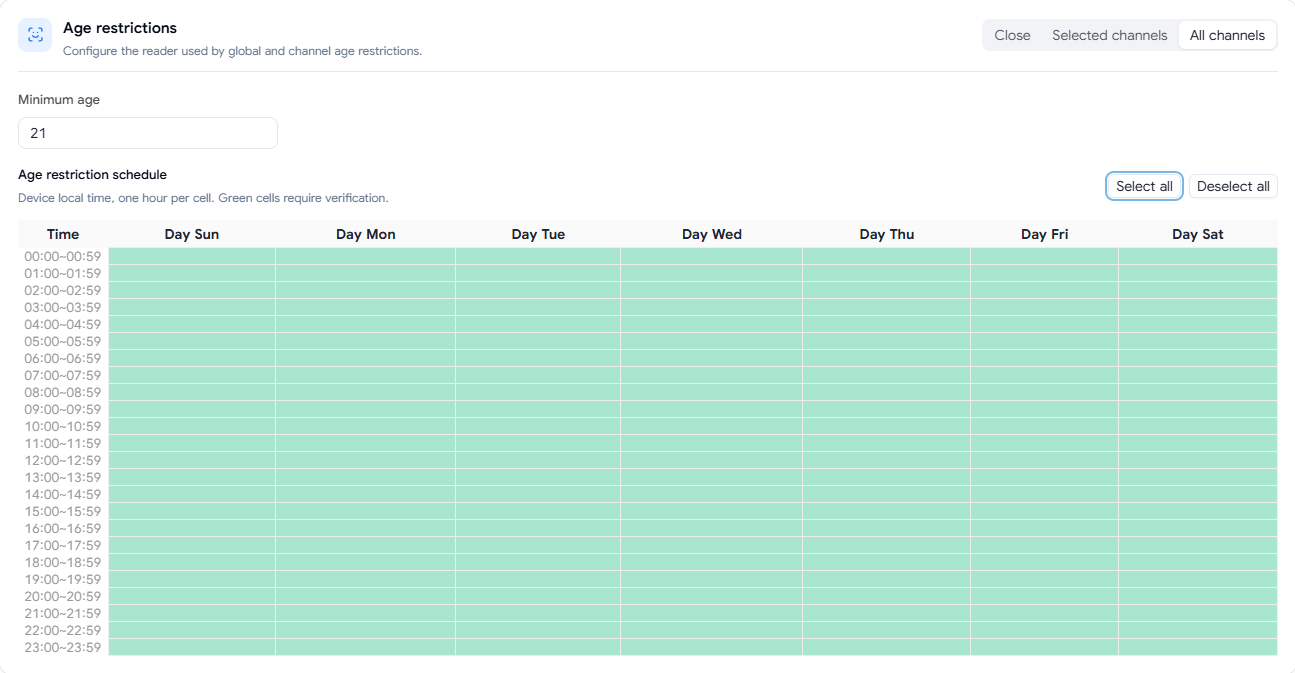
Use the all-channel option when the intended rule covers the whole machine. Enter the approved minimum age and review the weekly grid in the device’s local time.
Selected channels
Use selected-channel controls when only specified lanes should be subject to the rule. Check each physical lane against its software entry, then review the minimum age and weekly schedule for each configured lane.
In the illustrated schedule, green cells indicate hours that require verification. Confirm every intended day and hour, including transitions, and save the settings. Read back the effective configuration on the device after synchronization; do not assume a saved screen proves the machine received the update.
3. Prepare a controlled acceptance test
- Choose a test lane, product, approved test period and authorized test personnel. Use provider-approved test credentials or a controlled process that legitimately exercises both eligible and ineligible scenarios.
- Record the expected decision for each test. A decorative sample-ID picture does not verify the scanner.
- Confirm whether the test covers all channels or the selected lane and whether it is inside or outside a configured verification interval. Do not run a test that would breach the installation’s required restrictions.
- Keep personally identifying details out of photos, notes and screenshots. Record only the test scenario, expected outcome and observed behavior.
4. Run and record the test matrix
Scroll horizontally to see all table columns.
| Scenario | Expected result to verify | Record |
|---|---|---|
| Eligible authorized test credential, restricted lane, verification-required hour | Reader accepts the supported credential and the customer can proceed through the configured purchase flow. | Lane, local time, result and any message shown. |
| Ineligible authorized test credential, same lane and hour | Age-restricted purchase is blocked under the configured rule. | Lane, local time and observed block; no personal data. |
| Unreadable or unsupported test credential | Confirm the configured failure behavior and that an unverified restricted purchase cannot proceed when verification is required. | Reader message and result. |
| Other lanes and schedule boundaries | Confirm the effective scope and scheduled behavior match the operator’s approved policy for each scenario. | Physical lane, day, local time and actual outcome. |
For a successful supervised purchase, also compare the payment, machine order and physical vend. These are separate outcomes. Do not expose real identity information in test evidence.
5. Resolve mismatches and sign off
If a result differs from the approved rule, stop restricted sales on the affected machine or lane and review device connectivity, synchronized settings, local clock, lane mapping, reader status and supported credentials. Contact support with a masked settings screenshot and the expected versus observed result. Do not repeatedly issue remote dispense commands when the physical outcome is uncertain.
Retain the approved rule, device and lane scope, test date and local time, scenarios, outcomes, corrective action and operator sign-off. Re-test after changes to the reader, minimum age, schedule, timezone, channel mapping or system configuration.
Open the full machine setup checklistView the ID Scanner product